
Update your User Profile
How to Promote your Site with Sign Riders
April 22, 20123 Ways Images Boost Search Engine Optimization (SEO) in Mortgage Marketing
May 9, 2012All details about you (or indeed any User) are set up as a User Profile.
The User Profile defines you as a User in the system, which establishes how you appear etc, and also contains all your personal contact details, photo, BIO and so on.
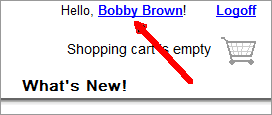
To edit YOUR Profile, simply click YOUR name at the top of any page to go directly to the Edit Page for your profile.
Or,
To Edit other Profiles, navigate to the “My Account” tab at the top of your user dashboard.

After clicking My Account, you’ll be taken to your account dashboard.
From here, click on the first link – “Member / User Profiles (Agents, LOs, Sponsors, Co-Listers)”.
You will then see a list of all the Users in your account.

Locate the profile you want to change and click the “Edit” link on the right.
Profile Type
When you edit your Profile, you should maintain your “Sponsor Type” as appropriate.
When you Modify an Agent profile – they will be setup as “Representing a property or listing”.
Also, Agents will be set to be “working with” a Loan Officer .
If you are not the Master User then some of these options may already be set as defaults for the Profile you are working on.
Profile Information and Contact Details
Add or edit the persons name and contact details here.
Choose a Business / Office profile to associate with them – this will then pull in the ‘company name’ and ‘logo’ when displayed on a property.
Personal Details
Use this section to complete your profile with a photo, licensing information, designations and an “about me” / service description.
Social Networking Connections
Any social profile pages entered here will display with your profile.
Automated Postings
This section allows you to authorize our service to connect and distribute content automatically on your other services. For example, every time a property site is turned ON, then the system can automatically sen a TWEET to that Agents Twitter account.