

Managing the Agents and Loan Officers in Your Account
Configure Your System Wide Defaults
March 29, 2012
Posting Agent’s Property Listings to Craigslist
March 29, 2012You can manage and control Agents who are part of your account. The Master User / Account Owner can also manage and control all Loan Officers too.
This is how you can determine which Agents (or Loan Officers) have access to certain features. You can even log in as them in order to see exactly what they are seeing, enabling you to give them the best experience possible.
To do this, simply navigate to the “My Account” tab at the top of your user dashboard.

After clicking My Account, you’ll be taken to your account dashboard.
From here, click on the first link – “Member / User Profiles (Agents, LOs, Sponsors, Co-Listers)”.
You will then see a list of all the other Users in your account.

In the “Actions” category on the right (highlighted in red in the image above) you will see 4 options – Edit, Delete, Permissions, Log In As. You can EDIT the user information, DELETE the user from your account, change their PERMISSIONS, or LOG IN AS them to see exactly what they are seeing.
Permissions
The Permissions for each type of User (Agent, or Loan officer) are initially set to reflect the best choices for you. But you can review these and change them for each User if you wish. The various permissions include:
- This user can promote listing sites – e.g. they can post to Craigslist
- This user can purchase domain names and sign riders
- This user can create new user profiles – e.g. can set up other Agents, Loan Officers etc.
- This user can create Banner Campaigns. This available of this option will depend on other factors such as the type of User and any other default options that have been set in the Account.
Other Actions for Users
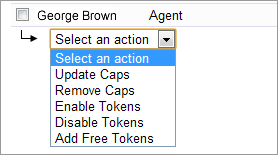 In addition to the Permissions there are also additional control you have over Users.
At the bottom left of the List of Users, the selection panel allows you to perform actions on one or more Users.
- Update Caps: This allows you to “cap” the maximum number of property sites this user can turn ON. For example, if this is 10 then the User will only be allowed 10 live sites at any time. This option can work in conjunction with Tokens.
- Remove Caps: This options removes any previous set cap limits for the selected Users
- Enable Tokens: Applies only if you have enabled Token Payments by Paypal. If Token payments were set to be be “Choose which Users require Tokens” this this is where you would set a User to be required to use Tokens.
- Disable Tokens: Allows you to disable the requirement for a User to use Tokens
- Add Free Tokens: Allows you to add any number of FREE tokens for a User.
This gives you complete control over your account, and how much access you give your account users.
