
Navigating the Mortgage Marketing System Dashboard

How to Increase Engagement on Your Mortgage Marketing Facebook Page
February 20, 2012New Feature: Enhanced Flyers for your Agent’s Property Listings
March 1, 2012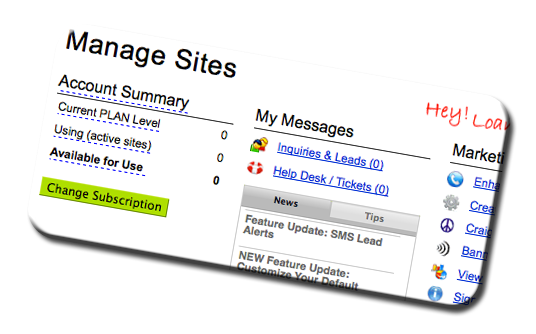 If you are new to the More Loans4U system, you may be confused where everything is located. Although we have tried to make the dashboard as easy as possible for you to navigate, we understand that there may still be some confusion.
When you login to the system and enter the dashboard, you will see 4 tabs at the very top of your screen – Manage Sites, My Account, How To, and What’s New. By default, you automatically land on the Manage Sites tab when you log in.
MANAGE SITES tab
The Manage Sites page contains 4 main columns at the top– Account Summary, My Messages, Marketing Tools, and Helpful Shortcuts.
The Account Summary column shows you a brief overview of your current plan level and your number of active sites. Master Users / Account Owners can change or stop your membership subscription by clicking the green “Change Subscription” button below the Account Summary column.
My Messages is where you can keep track of your inquiries and leads, and your help desk / support tickets. Clicking the inquiries and leads button will take you to a list of all your leads so that you can easily keep track of who you need to follow up with. The help desk / tickets link will show you details on all of your open support tickets, and describes how to open a new support ticket if you are having any technical difficulties.
The Marketing Tools column is where you can control some of more commonly used bulk-marketing features for your property sites.
The Helpful Shortcuts column is filled with useful information that will help you get the most out of your experience. Simply click each link to learn more and to set up some of the most important features in your new marketing system.
MY ACCOUNT tab
The My Account tab is where you can control all of your account setting and defaults including office profiles, user profiles; and for Master Users / Account Owners: your default preferences, your billing information, banner ad campaigns, and service branding options.
HOW TO tab
The How To tab is the information library. Here you will find on-demand instructional training videos, PDF help guides, and downloadable marketing materials including ready-to-go presentations for you to use to recruit Agents to your new service, listing presentations for Agents too, and even marketing flyers for Agents to give to sellers.
WHAT’S NEW tab
Clicking on the What’s New tab will take you to our blog where you can keep track of all the latest news, feature updates, and marketing tips.